📜 Text Chat and Emoting
➡️ How to Learn a New Language
💻 How to do Text RP
Wasteland is a fully text-based RP server, meaning there is no VOIP. Dialogue for your character is similar to how you read dialogue in a book. The two primary methods of communication are "saying" things and "emoting" things, often in conjunction.
/say I don't think this is a good idea.
- Will appear in-game as:
[Character Name] says "I don't think this is a good idea."
- Will appear in-game as:
/me frowns, backing up a step from Jane. "I don't think this is a good idea," she says, concern in her voice.
- Will appear in-game as:
[Character Name] frowns, backing up a step from Jane. "I don't think this is a good idea," she says, concern in her voice.
- Will appear in-game as:
Emotes are good for describing what other players see, since a lot of roleplay takes place in the mind's eye. When emoting, you should take care not to show your character's thoughts (how would the other characters know what your character is thinking?), or force another character to do a thing (godmodding):
🚫 /me frowns. "I don't think this is a good idea," she says, thinking about the time when she was three and this exact thing happened. She feels worried about it.
- Instead, use emotes to suggest things. She looks concerned. Perhaps she is thinking of a past experience.
🚫 /me frowns. "I don't think this is a good idea," she says, and Bill shoots at the ground instead of the infected.
- You can't control what Bill does. Instead, try
/me reaches for Bill's gun to try and get him to lower it.Leaving him the opportunity to refuse is important.
- You can't control what Bill does. Instead, try
It's also possible to change the volume at which you emote. Using something like /meloud or /w will cause the range others can hear your character at to increase or decrease.
/w I don't think this is a good idea.
- Will appear in-game as:
[Name] whispers "I don't think this is a good idea."It will only be heard by players up to 1 square away.
- Will appear in-game as:
/meshout throws her fist into the air. "For the revolution!" she cries.
- Will appear in-game as:
[Name] throws her first into the air. "For the revolution!" she cries.It will be heard by players up to fifty squares away.
- Will appear in-game as:
When emoting, remember that even if you're mentally visualizing what your character is doing, other players can't see it. They won't know the nuance of what you're saying if you don't spell it out. For example, you might conclude a tense scene by saying:
/me walks away.
But this doesn't actually tell anybody what your character is feeling or why they walked away. Additionally, it has a problem that is unique to roleplay, which is that you haven't given people any time to respond to what you just did, the way they would be able to in a split second in real life. People can't type that fast!
Instead, consider:
/me sets his jaw, anger burning in his eyes, but he says nothing. After a tense moment, he turns on his heel and moves to leave.
And then you walk like four paces away and wait for a second, to see if they're going to respond or not. You've given them more to work with! RP is always better when it's collaborative.
You can describe the environment around you by using the /env command.
/env the room is messy and has a layer of dust over it.
Note that /env is an in character channel, not an OOC one. It is not intended for OOC messages.
A more detailed list of RP chat commands and their combinations can be found in the WL Wiki. You can also type /help while in-game to see the commands.
✈️
Using Other Languages
Wasteland is an English-based server so you are expected to RP in English-- but what if your character knows other languages? That's where the language system comes into play.
When you are creating your character, you can detail the languages they know in their backstory up to a maximum of four. Something as simple as "he was born and raised in Germany and learned English in school" or "she grew up in a bilingual household that spoke both English and Spanish" are usually enough to get your character that second language.
- If you try for a third (or more), you are expected to devote more and more of your character's backstory to why they know that language. The third language requires a chunky paragraph of text devoted to how, why, where they learned it, like a little learning montage. Anything after that and you're going to need a bio entirely devoted to linguistics.
Once your character is approved, you can open a Language request ticket to request the language. You will need to link your character's profile and showcase the sections that mention the language(s) for staff to review and add.
Once additional languages are added to your character, you have a few options for how to speak in different them:
- You can navigate to the cogwheel on your chatbox and select Actions > Choose Language > [Language]. Then, you type what you want your character to say, and what your character says will only be understood to other characters who know the language.
- You can change languages using a chat command. This is done by typing /lang [code] into the chat box. The language codes can be found here: Chat System.
- You can also send single messages in a different language using Chat Commands. This allows you to keep your language set to a different one while speaking in another. This is done by typing a standard chat command and following it with ":[code]"; for example signing a quick message to someone else can be done by typing /say:asl Good morning. How are you?
- Some languages, like Spanish and Portuguese, have a built-in overlap in the system that allows you to pick up certain words that are being said. It's not a reliable way to parse out the conversation, but there is still some mutual intelligibility.
The available languages are:
Afrikaans, Albanian, American Sign Language, Apachean, Arabic, Bengali, Bhojpuri, Bosnian, Bulgarian, Chinese, Croatian, Czech, Danish, Dutch, English, Esperanto, Estonian, Farsi, Filipino, Finnish, French, Gaelic, German, Greek, Gujarati, Hausa, Hawaiian, Hebrew, Hindi, Hungarian, Icelandic, Indonesian, Inuit, Iranian Persian, Iroquoian, Italian, Japanese, Javanese, Korean, Latin, Latvian, Lithuanian, Malay, Marathi, Muskogean, Na-Dene, Nigerian Pidgin, Norwegian, Polish, Portuguese, Romanian, Russian, Sehaptian, Salish, Serbian, Sinhala, Siouan, Slovak, Slovenian, Spanish, Swahili, Swedish, Tagalog, Tamil, Telugu, Thai, Turkish, Ukrainian, Urdu, Uto-Aztecan, Vietnamese, Welsh, Western Punjabi, Yiddish
We also have Native American language families: Salish, Na-Dene, Uto-Aztecan, Apachean, Algonquian, Inuit, Iroquoian, Siouan, Sahaptian, and Muskogean. More info about why we don't have specific Native languages can be found here.
But what if you want your character to learn another language while in game? That's where language learning comes into play.
⌛
Learning a Language
You learn new languages through a multi-week RP process with another RPer who already speaks that language. This is mostly player-driven, with just a quick check of your work at the end before you are granted the language. If your character wants to learn a new language, you need to take eight in-game months (approx. 2 IRL months) to do it. The exact requirements are:
- At least 8 in-game months of RP screenshots at one screenshot per in-game month (so, 8 screenshots)
- At least four of those screenshots should be with another character who speaks the language (not just book learning)
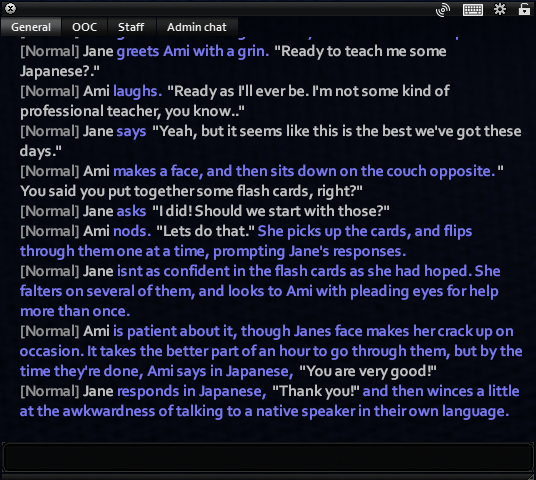
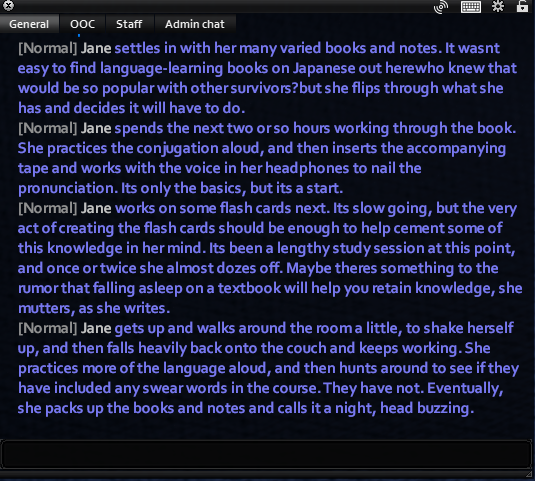
- All study sessions should be at least three good-sized paragraphs of writing, or some good conversational back-and-forth with another player
Only one language can be learned at a time, so you can't learn German and Japanese and Russian in an eight month period.
Here is an example of an acceptable "study session" with another player:
And here is an example of an acceptable solo study session:
Collect 8 of those (minimum 4 with another player teaching), keeping the screenshots in a dedicated folder somewhere until you are ready. Then, open a general ticket and present the screenshots to the mods. You will be granted the language from there.